Browser-based admin
A browser dashboard for organizations, devices, locations, users, roles, and the full compliance suite. Nothing to install on the workstation.
 EMDT
EMDTEmergency Medical Device Tracker
EMDT catalogs your entire fleet of AEDs, crash carts, and medical equipment across every station and facility. Scan a QR code, attach a photo, pull a compliance report — from the web dashboard or the mobile app already in your pocket.
Admin Web Dashboard
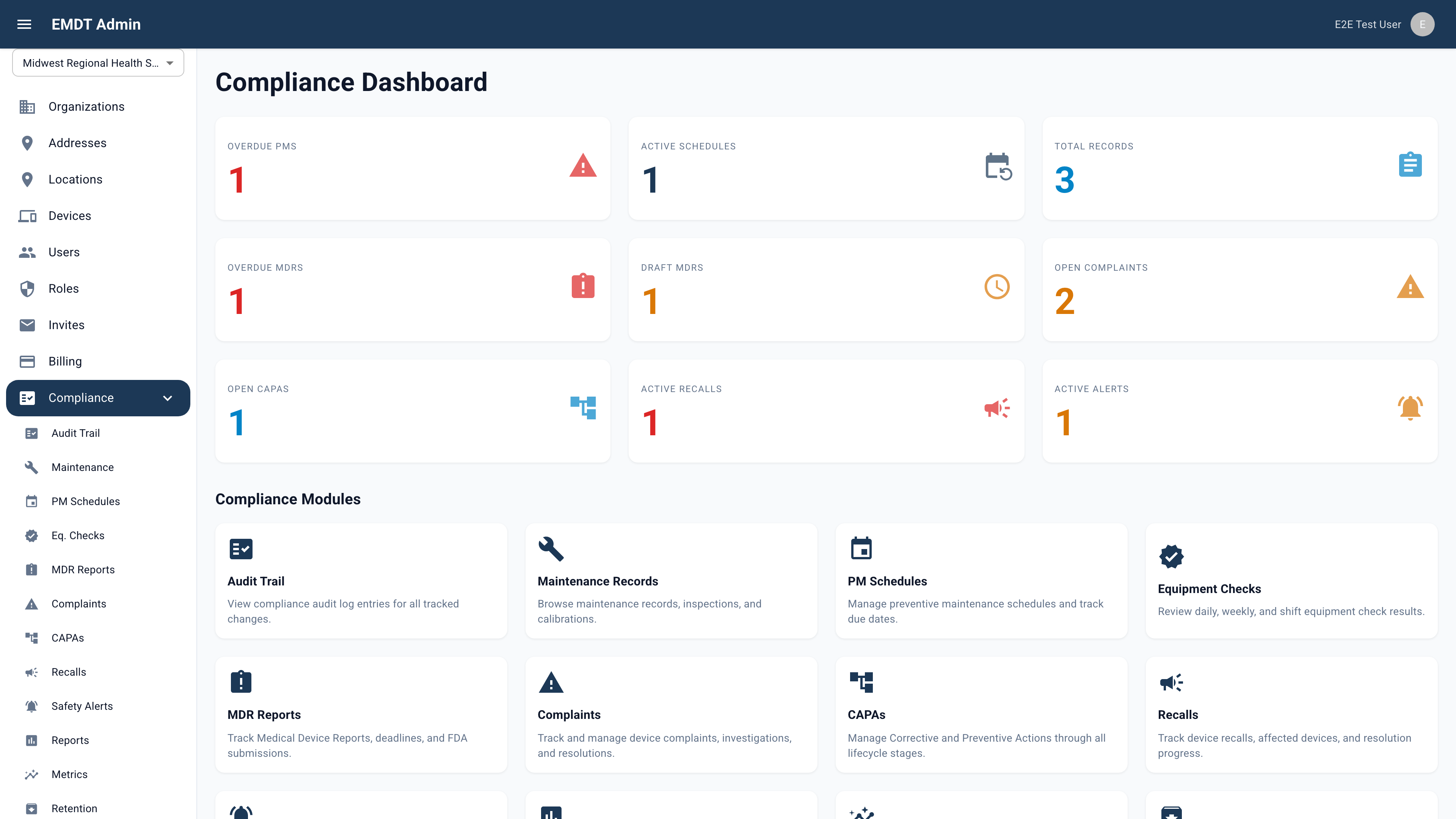
The EMDT admin dashboard runs in any modern browser — no software to install. Compliance officers and agency administrators manage organizations, devices, users, roles, and a full compliance suite from a single, unified workspace.
iOS & Android Apps
The EMDT mobile apps run on iOS and Android. Both are in App Store and Google Play review; download links go live when approved.
iPad App
On iPad the EMDT app uses the extra canvas to show more at once — longer device and vehicle lists, the full compliance menu, and roomier detail views — while running the same organization-scoped records, QR scanning, photo documentation, and e-signature workflows as the phone. One universal app, downloaded once.
What you get
A browser dashboard, native iOS and Android apps, and a secure multi-tenant cloud platform — all reading and writing the same organization-scoped device, location, and compliance records.
A browser dashboard for organizations, devices, locations, users, roles, and the full compliance suite. Nothing to install on the workstation.
iOS and Android apps with QR scanning, photo attachment, and the compliance suite on mobile — the work happens where the devices are.
Organization → Address → Location → Device. The same structure every EMS agency and healthcare facility already uses on paper.
Append-only audit trail with ALCOA+ attributability, HMAC-SHA256 e-signatures bound to records, and configurable per-organization retention policies.
Every device gets a QR code. Field users open a device record by scanning it, not by hunting through lists.
Granular permissions plus an authority level — administrators can never be edited by anyone they outrank.
A compliance-first platform
EMDT keeps compliance records in a secure, durable cloud database with redundant storage for device images. The compliance platform implements 21 CFR Part 11 e-signatures, an ALCOA+ audit trail, and MDR / CAPA / recall workflows end to end.
Estimate your savings
EMDT gives every AED, monitor, and crash cart a QR code and a single accountable record, so devices are located instead of written off, and a live inventory replaces the manual audit. Enter a few figures about your own fleet to see an illustrative estimate — every assumption below is yours to set.
Every figure above is an example starting point — change them to match your own operation.
Your estimated savings
Replacement avoided + audit labor saved.
Estimates only, based on the figures you enter; your results will vary. This is an illustrative model, not a quote, guarantee, or industry benchmark.
Why EMDT
The compliance suite implements 21 CFR Part 11 throughout — an append-only audit trail with field-level change tracking and ALCOA+ attributability, HMAC-SHA256 e-signatures bound to individual records, and configurable per-organization retention. MDR reports carry a 10-work-day due date; CAPAs track a 7-stage pipeline; recalls auto-match affected devices by make and model.
Every record — device, location, compliance document, audit entry — is scoped to your organization and enforced by the platform itself, not just in the interface. Granular permissions at the organization level (nine) and the address level (five) let an administrator grant a paramedic view-only access to one station while giving a BMET write access across all.
The mobile app is designed for 24-hour shifts in ambulances and station hallways, not office desks. QR scanning pre-fills device forms; camera upload attaches maintenance photos without leaving the record; the app surfaces a banner when network connectivity drops.
Questions & answers
EMDT (Emergency Medical Device Tracker) catalogs an organization’s fleet of AEDs, crash carts, and medical equipment across every station and facility, and tracks the compliance work around them. Field users scan a QR code, attach a photo, and pull a compliance report — from a browser dashboard or the mobile app — across a four-level Organization → Address → Location → Device hierarchy.
No. EMDT is an inventory management and compliance tracking tool. It is not a medical device, not Software as a Medical Device (SaMD), and not a substitute for regulatory clearance or accreditation. It tracks medical device inventory and compliance workflows; it performs no clinical function.
EMDT runs as a browser admin dashboard (no install) plus native iOS and Android apps — one universal app that also adapts to iPad. The mobile apps are in App Store and Google Play review at the moment, so download links go live when approved. Sign-in uses enterprise single sign-on (SSO) — email, Google, Apple, or Microsoft.
EMDT’s compliance suite is designed to align with 21 CFR Part 11 — it is not a certified or validated system. It implements an append-only, org-wide audit trail with field-level change tracking and ALCOA+ attributability, HMAC-SHA256 e-signatures bound to individual records, and configurable per-organization retention. MDR reports, CAPAs, complaints, recalls, and safety alerts each have full workflows. Certification of any specific regulated workflow remains the customer’s responsibility.
The mobile apps scan device QR codes from the camera (with a fallback when a code is hard to read) to pre-fill the device form, attach photos to devices, locations, and addresses, and run the full compliance tab — maintenance records, PM schedules, equipment checks, MDR reports, CAPAs, complaints, recalls, and safety alerts — with the same PIN-protected e-signature required for workflow state transitions. The app surfaces a banner when network connectivity drops.
EMDT is built for EMS agencies and healthcare facilities that need device accountability and compliance records across multiple stations. You can open the EMDT admin dashboard to manage organizations, devices, users, roles, and the compliance suite; the iOS and Android apps follow when store review clears. There is no public online price — contact us through the website to discuss your deployment.
Plans & availability
Create a free account and open the live EMDT web app today. EMDT is configured per organization — your stations, devices, users, and the compliance workflows your regulators expect — and a guided demo walks your team through real device check-out, audit-trail, and MDR/CAPA flows on your own scenario.
EMDT is licensed per engagement and scoped to your organization size and compliance needs — there is no online checkout. Request pricing and a human director will scope it with you.
Create a free account and open the EMDT web app — manage organizations, devices, users, and the full compliance suite. The iOS and Android apps are in store review — download links go live the moment they are approved.
EMDT is an inventory management and compliance tracking tool. It is not a medical device, Software as a Medical Device (SaMD), or a substitute for regulatory clearance or accreditation.