Redmer Software Company · 1999–2001 · Adobe InDesign pipeline
The lab tool that composited school portraits into yearbooks, class composites, and ID cards — at lab scale.
EZ-IMAGE was the photographic image compositing and conversion utility purchased by the nation's largest School Photography Companies for use inside their photo-lab production workflows. Built as an Adobe InDesign companion application, it ingested a lab's customer database and student-portrait inventory and emitted InDesign-ready layouts — class composite photographs, yearbook pages, ID cards, batch-processed image inventories, and many other digital products — across an industry that ran on tight deadlines and unforgiving print specs.
A database-driven Adobe InDesign companion, built for the lab floor.
EZ-IMAGE pulled the customer database, the student-portrait inventory, and the InDesign production layouts into one Windows-desktop tool. Lab operators picked the source records ("all of Order_Id TESTNEW, sorted by Last_Name"), picked a template, picked a destination folder, and the application emitted a full set of InDesign-ready composite pages — or batch-processed the underlying images in a single pass first. The five tabs across the top of the screen mapped 1-to-1 with the lab's production steps.
Source Information — query the lab databaseDatabase-driven from day one. The screenshots show EZ-IMAGE connected to an EZLAB2K database, pulling from a `tbl_Customers` customer table with selection criteria (e.g., `Order_Id = TESTNEW`), sort orders, and image-tag mapping by Subject_Id. Operators picked the records once; the tool drove every downstream step.
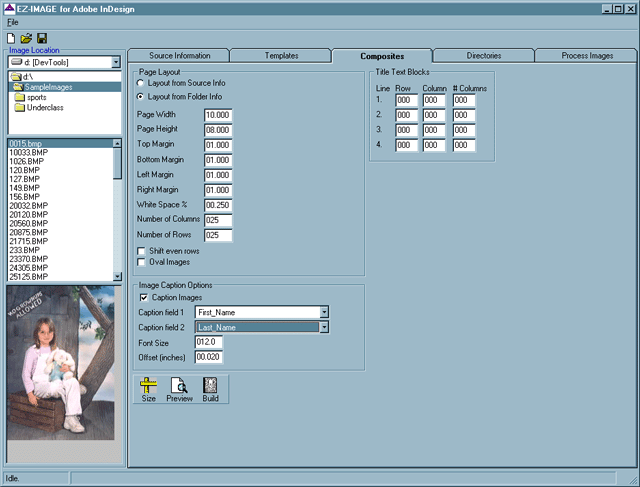
Composites — class composite pages, 25×25-readyConfigurable page layout for class composite pages: page width / height (inches), top / bottom / left / right margins, white-space ratio, number of columns, number of rows (the tab shows 25 of each — i.e., up to 625 portraits per composite), 4-line title text blocks (row / column / column-width per line), caption fields tied to database columns (First_Name, Last_Name), font size, oval vs. rectangular crops, and even-row shift for school-portrait aesthetics. Size / Preview / Build action buttons emitted the finished composite into InDesign.
Process Images — batch processing, lab-scaleBatch processing across the entire image inventory: resize (percentage), crop, rotation angle, sharpen, contrast, gamma correct, deskew, despeckle, flip, invert, stretch intensity. Save-as a configurable format (PNG visible in the screenshot; other formats supported). The lab's full image inventory could be re-processed in a single pass with consistent parameters across thousands of images.
Templates + Directories — production reuseLayout templates the lab built once and reused across every school job: composite pages, yearbook layouts, ID cards. Directories tab navigated the lab's network image storage so a job's images could be found wherever they sat — no hard-coded paths, no per-job re-import.
Yearbook layouts, ID cards, and beyondThe same source-data + template + layout pipeline that emitted class composites also drove yearbook pages, school ID cards, and the rest of the lab's digital products. The template system was the unit of reuse; the underlying data + image-processing engine stayed constant across product types.
Built in Visual Basic 6 + LEADTOOLSNative Windows desktop application built in Visual Basic 6 with LEADTOOLS 10 imaging and an Access/Jet database reached over ADO/ODBC. The second generation drove Adobe InDesign 1.0 directly over COM automation; the first generation emitted layouts through PowerPoint 97. Designed for the high-throughput lab workstations of the late-1990s school-photography industry.
A Redmer Software product purchased by the nation's largest School Photography Companies.
Where EZ-SNAP captured the photo order at the studio and EZ-VIEW shipped the finished portrait to the school, EZ-IMAGE sat between them — inside the lab — turning the raw portrait inventory + customer database into the printable digital products the lab actually sold. Class composites, yearbook pages, school ID cards, and the long tail of derivative products the lab built for each school. The same Redmer Software Company engineering posture that ran across all three products.
Purchased by the nation's largest School Photography Companies
Olan Mills and other major U.S. school-photography companies purchased EZ-IMAGE for use in their lab production workflows. EZ-SNAP captured the orders at the studio; EZ-VIEW shipped the records to the school; EZ-IMAGE turned the raw images into the printable products the lab sold.
Class composite photographs
Up to 25 columns × 25 rows of portraits on a single composite page, with configurable margins, title blocks, caption fields, font sizes, and oval-vs-rectangular crops. The bread-and-butter product of the school-photography industry, automated end-to-end from the lab database.
Yearbook layout + print
The template system drove yearbook page layouts directly. Lab operators picked a template, picked the source records for that page, and the application emitted the InDesign layout — page-by-page through an entire school's yearbook.
ID cards on demand
Same source-data + template pipeline emitted school ID card layouts at scale. One template, hundreds of cards per school, full database integration so the right portrait landed next to the right student record on every card.
Lab-scale batch image processing
Resize, crop, rotation, sharpen, contrast, gamma, deskew, despeckle, flip, invert, stretch intensity — across the lab's full image inventory in a single pass. Consistent parameters meant a school's photos all printed at the same baseline quality, regardless of which photographer captured them at which session.
The Redmer Software pipeline, end to end
EZ-SNAP → EZ-IMAGE → EZ-VIEW was a closed workflow loop in the late-1990s school-photography industry: capture the order at the studio (EZ-SNAP), process the images and generate the finished products in the lab (EZ-IMAGE), distribute the records and portraits to the schools (EZ-VIEW). Each product was useful on its own; the three together were the platform.
A lab-floor tool that shipped
Customer databases, image inventories, InDesign-ready output — at lab scale.
EZ-IMAGE shipped to school-photography labs across the United States from 1999 onward, where it sat alongside Adobe InDesign on the lab's production workstations and turned raw portrait inventories into the finished digital products the lab sold to schools. Visual Basic 6 with LEADTOOLS 10 imaging over an Access/Jet database — driving InDesign 1.0 via COM in its second generation, PowerPoint 97 in its first; same operator-first engineering posture that powered EZ-SNAP on the studio floor and EZ-VIEW at the school.
Era
1999–2001
Company
Redmer Software Company
Integration
Adobe InDesign 1.0 COM companion
Stack
VB6 · LEADTOOLS 10 · Access/Jet (ADO/ODBC)
Why this case study matters
The lab-side product that closed the Redmer Software workflow loop.
Database-driven from day one
EZ-IMAGE didn't ask operators to drag-and-drop. It queried the lab's customer database directly, selected records by the lab's own criteria, and tied every layout cell to a database column. That data-first architecture is the same posture A1SI ships under today on CVWS (the weigh-station database is the source of truth), EMDT (the medical-device record drives every screen), and TERM (regulated-mode sessions tie every transcript to a database identity).
Built for lab-floor production, not desktop publishing
School-photography labs of the late-1990s ran on tight deadlines (every school's portraits had to ship before the kids forgot what they wore that day) and unforgiving print specs (the wrong margin on a class composite was a reprint). EZ-IMAGE was tuned for that environment — fast batch operations, Size / Preview / Build buttons that meant the operator could check the page before committing the print run, consistent processing across the lab's full image inventory.
A workflow loop that closed
EZ-SNAP, EZ-VIEW, and EZ-IMAGE together formed a closed loop in the school-photography industry: capture the order, process the images, distribute the finished records. Each product was useful standalone; the three together formed Redmer Software Company's platform — and the engineering discipline that grew from running a multi-product platform in the late-1990s carries forward into A1SI's current multi-product portfolio (CVWS / EMDT / IMAGEPREP / CRM / HRMS / TERM / Home Manager / IoT WiFi / Wireless Bridges).
Need a lab-scale tool that talks to a database and a layout engine?
A1SI has been building data-driven production tools since 1997 — from school-photography labs running Adobe InDesign to commercial-vehicle yards running CVWS to EMS agencies running EMDT. Same engineering posture, modern stacks (Python, React Native, C#, embedded Jetson and ESP32). If your production workflow needs a tool that knows the database and respects the deadline, we'd like to hear about it.
"Adobe" and "InDesign" are trademarks of Adobe Inc. "Olan Mills" is a trademark associated with the Olan Mills Studios brand (acquired by Lifetouch / Shutterfly in 2011). "Microsoft", "Windows", "Visual Basic", "PowerPoint", and "Access" are trademarks of Microsoft Corporation. "LEADTOOLS" is a trademark of LEAD Technologies, Inc. "Kodak" is a trademark of the Eastman Kodak Company. The case study above describes engineering work performed by Redmer Software Company (1997–2001), the predecessor business that informed the engineering posture A1 Systems Integrators (A1SI) ships under today. The case study is preserved on this page as historical portfolio and pedigree — not as a currently shipping product offering. A1SI is not affiliated with or endorsed by Adobe Inc., Olan Mills, Lifetouch, Shutterfly, Microsoft Corporation, the Eastman Kodak Company, or any other named third party today; IP ownership of any deployed derivatives belongs to the respective program owners.